YouTube Music
- 4.5
- Rating
- 5.00B
- Installs
- Free
- Price

 Analysis by App-foxy
I spent time with YouTube Music as an everyday listening app, paying particular attention to how comfortably it works in different situations and for people with different needs. It is a free music and audio app from Google LLC, and its enormous reach is easy to understand: the service combines familiar YouTube discovery with a dedicated listening interface, making it convenient when I want to move from a known song to something new without changing apps.
My overall impression is positive, but not uncritical. The app is strongest when I want flexible discovery, music videos alongside songs, and recommendations shaped around my listening habits. It is less convincing for someone who wants a quiet, highly controlled music library with minimal visual movement, predictable organization, or the most generous free listening experience. The interface is approachable, yet the amount of content can sometimes make the experience feel busy.
How the app feels to use in everyday listening
I find YouTube Music most comfortable when I decide whether I’m in the mood to search or to browse: search gets me to a known track quickly, while recommendations work better when I have time to explore. A small routine—starting from a saved album or familiar artist before opening the home screen—can make casual listening feel less like navigating a feed. That everyday balance sets up the question of whether the app remains useful once its novelty wears off.
In-Depth Coverage of YouTube Music
Readability and navigation are generally approachable
The main experience is built around familiar areas for finding music, exploring suggestions, and returning to personal listening. That structure means I rarely feel completely lost, even when I open the app with no specific song in mind. Search is the most dependable starting point: I can type an artist, album, lyric fragment, or track title and usually begin from there rather than sorting through endless recommendations.
For a new user, this matters because the app does not require a complicated setup before it becomes useful. I can search for something immediately, play it, and gradually build a personal routine. The recognizable Google design language also helps if I already use other Google services. Buttons, menus, and playback controls feel familiar enough that I spend more time listening and less time learning where basic actions are located.
That said, readability is not only about whether text can be understood. It is also about how much information competes for attention. Album artwork, recommendation rows, artist suggestions, video options, and personalized mixes can create a dense screen. I find the app easier to use when I decide what I want first—search, saved music, or a recommendation—rather than trying to process every card on the home screen.
One practical habit helps: I use search as a direct route and the home screen as a discovery space. If I already know the artist or track, searching is faster and clearer. If I am cooking, commuting, or working and want background music, the recommendations are more useful. Treating those areas differently reduces the feeling that the app is asking me to make too many choices at once.
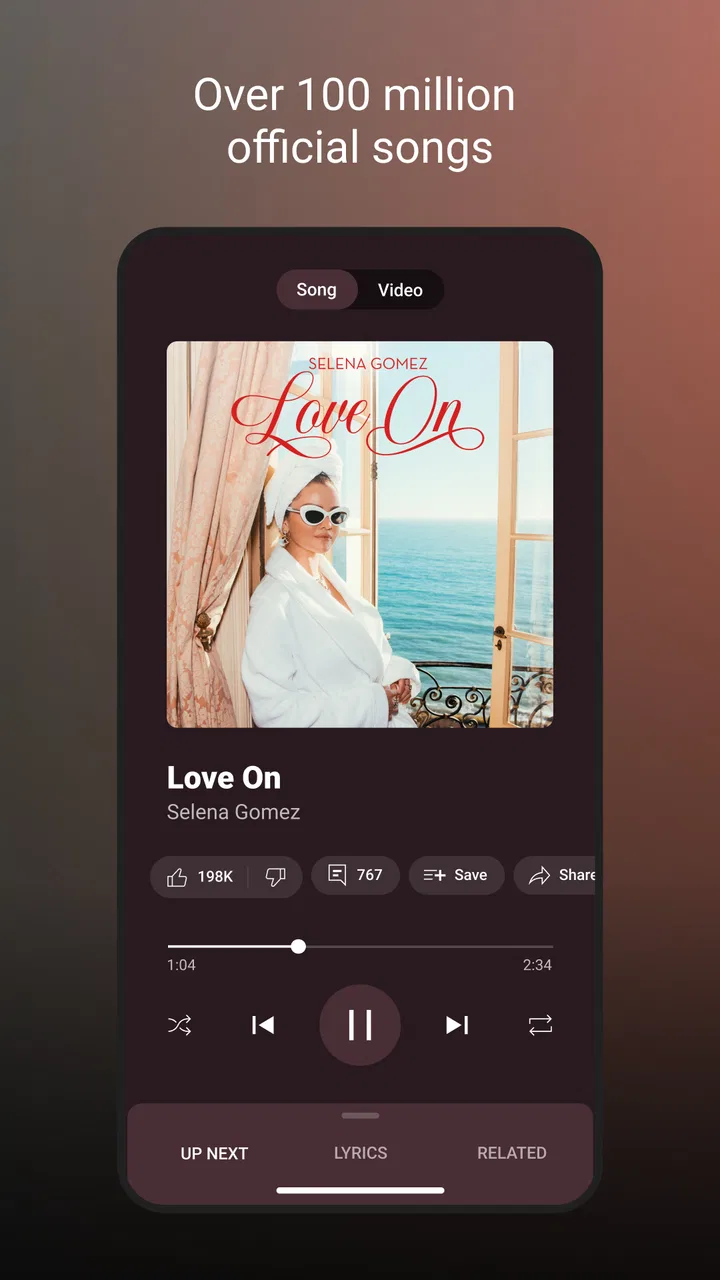
The player itself is familiar, with the expected focus on the current track and controls for moving through a listening session. I appreciate not having to relearn basic playback each time I switch between a song and a music video. The connection to YouTube also makes it easier to encounter performances or visual versions that may not appear in a traditional audio-only catalog.
Discovery is powerful, but it can make organization feel secondary
The best part of the service is the bridge between intentional listening and accidental discovery. I can begin with one familiar artist and quickly find related tracks, live material, or a different version of a song. This is more fluid than many conventional music libraries, where discovery may be limited to editorial playlists or a fixed catalog structure.
That flexibility has a trade-off. When I want to manage music like a carefully arranged personal collection, the recommendation-heavy design can feel less focused. The app encourages me to keep listening rather than stop and organize. For some people that is exactly the appeal; for others, especially listeners who rely on a stable and uncluttered routine, it may feel distracting.
I also think about cognitive load here. A person who is tired, dealing with attention difficulties, or simply trying to start music quickly may benefit from a familiar saved mix or a direct search. The same person may find a long stream of changing suggestions tiring. My advice is to create a small set of dependable listening routes—favorite artists, recurring playlists, or saved albums—so the app remains useful without demanding fresh decisions every time.
Motor and sensory considerations in real use
Music apps are often used one-handed, while walking, carrying a bag, cooking, or sitting in a vehicle as a passenger. YouTube Music works well enough in these contexts when I prepare the session first. Starting a playlist or album before I become busy is much easier than trying to search, inspect results, and choose between audio and video while my attention is divided.
For users with limited dexterity, the number of small decisions may matter more than the number of taps. Selecting the right result can require visual attention because an artist page may contain several versions, uploads, or related choices. I find that searching with a distinctive artist and track combination reduces mistakes. It is also easier to begin from a known saved item than to browse through multiple rows of artwork.
People who are sensitive to visual stimulation may prefer the audio-focused route rather than browsing video material. The service is closely connected to YouTube’s broader media world, so visual content is part of its character. That is useful for listeners who enjoy concerts, official videos, and alternate performances, but it may be less comfortable for someone who wants the calmest possible audio environment.
On the other hand, the visual connection can be a genuine advantage for people who understand music through performance. Seeing an artist, instrument, or live setting may add context that a plain audio player cannot provide. I would not treat the video side as a distraction in every case; it is better understood as an extra layer that some listeners will value and others will want to avoid.
You May Also Like

 AccuWeather: Weather Radar
AccuWeather Review: A Quick, Clear Forecast for Everyday Decisions
For everyday plans, the best forecast is the one you can understand quickly. AccuWeather makes rain timing, radar, and local conditions easy to act on, with a few trade-offs.

 Hill Climb Racing
Why Hill Climb Racing Still Turns Crashes Into One More Run
A tiny car, a bumpy hill and one more upgrade: Hill Climb Racing keeps resurfacing because its simple chaos makes every near-miss feel personal.

 AliExpress - Shopping App
AliExpress Makes Global Shopping Feel Personal, but Shoppers Bear the Risk
AliExpress turns a global marketplace into a pocket-sized discovery engine. Its reach is useful, its shopping loop compelling, and its trade-offs easy to miss.

 Lords Mobile: Kingdom Wars
Lords Mobile Is a Kingdom-Building Routine, Not a Quick Match
A case-by-case verdict on the building, battles, device demands, and social commitments that make Lords Mobile rewarding for some players and exhausting for others.

 PDF Scanner app - TapScanner
TapScanner Makes Paperwork Easier to Capture, Check, and Share
TapScanner makes scanning with a phone feel less like a rescue operation and more like a dependable step in getting work done. Its capture tools are useful, though not flawless.

 Block Blast!
Block Blast! Shows How Much a Puzzle Game Can Leave Out
A quiet grid game shows why puzzle players increasingly value instant clarity, repeatable skill and low-pressure play—and where the genre still needs to catch up.
More From Our News Desk
View All News


Audio clarity also depends on the surrounding situation. In a quiet room, I can pay attention to the difference between a studio track and a live performance. On public transport or during exercise, I am more likely to value a reliable queue and recognizable controls than subtle sound differences. The app is therefore most comfortable when I match the listening mode to the environment instead of expecting one layout to suit every moment.
Situational access: home, travel, work, and shared spaces
A realistic example is my morning routine. I may search for one familiar track while getting ready, then let the app continue with related music as I move around the room. That saves time because I do not need to build a complete playlist before starting. If I am working, I prefer choosing a longer, predictable collection in advance so recommendations do not pull my attention away from the task.
During travel, the important question is not simply whether the app has a large catalog. It is whether I can reach something suitable quickly when the environment is noisy, my connection is inconsistent, or I am sharing space with other people. I recommend preparing the music before leaving rather than relying on spontaneous browsing. That workflow also helps users who find changing screens or repeated searches tiring.
In a shared household, the personalized nature of the service can be convenient and awkward at the same time. Recommendations are more useful when they reflect one person’s habits, but a shared device or mixed listening history can make the home screen less predictable. If several people use the same account or device, I would expect suggestions to become less precisely tailored. For personal listening, the experience feels more coherent.
For work and study, I like the ability to start from a known artist and let related music fill the session. Still, I would not choose the app solely because it can keep playing indefinitely. The discovery features can encourage one more song, one more video, or one more search. If concentration is the priority, I use a prepared queue and avoid opening recommendation pages during the session.
For exercise, the service is useful when I already know the energy level I want. A saved collection is more practical than browsing while moving. The same principle applies to household tasks: the app is accessible in practice when the user reduces the need for precise interaction after playback begins.
Where the experience still creates barriers
The biggest limitation is the tension between abundance and simplicity. There is a lot to discover, but more choice does not automatically mean better access. A person who needs a low-distraction interface may find the mixture of recommendations, artwork, videos, and related content demanding. I can work around that by using direct search and saved listening routes, but the app does not always feel calm by default.
Another friction point is the difference between music as a personal library and music as a constantly refreshed feed. Traditional alternatives often feel more deliberate: I open a library, choose an album, and stay within that structure. YouTube Music is more fluid and exploratory. That is a strength for curious listeners, but it can be a weakness for anyone who wants strict separation between albums, playlists, videos, and casual discoveries.
The free model also deserves a realistic explanation. The app itself is free, which makes it easy to try without an upfront purchase. However, in-app purchases are listed from a few cents to nearly a thousand dollars per item, so anyone managing spending should review purchase controls on the relevant device account. I would not assume that “free” means every listening preference will be equally convenient without additional choices or interruptions.
The Teen content rating is another useful signal for families. It does not mean every listening situation will suit every child, and parents should still consider the specific artists, videos, and search habits involved. The broad connection to YouTube makes personal judgment important, especially when a younger listener can move from a chosen song into related material.
I also would not recommend this app as the first choice for someone who wants a specialist audio tool with extensive library-management controls, studio-oriented workflows, or a minimal player that stays out of the way. A more focused audio service may be better for that person. Likewise, listeners who strongly dislike music videos or recommendation feeds may prefer a conventional streaming library with a clearer audio-only identity.
Three workflows that make the app more inclusive in practice
My first useful workflow is the “known starting point” method. I search for a precise artist and track, begin playback, and only then decide whether I want related recommendations. This avoids scanning several content rows when I am in a hurry and reduces the visual and cognitive effort needed to reach music.
The second is the “prepare before pressure” method. Before commuting, exercising, or entering a busy work period, I choose the listening session while I am still in a calm environment. Once playback starts, I can leave the phone alone. This is especially helpful for people who find repeated tapping difficult or who cannot comfortably inspect a busy screen while moving.
The third is separating audio discovery from visual discovery. When I want background music, I stay with familiar tracks, albums, or mixes. When I actively want a performance, I use the video side deliberately. Keeping those purposes separate makes the service feel less cluttered and prevents visual content from taking over a session that was meant to be audio only.
A fourth tip is to judge recommendations over time rather than after one unusual result. Personalized systems can reflect recent listening, shared-device habits, or a temporary mood. If the home screen stops feeling useful, I return to direct searches and saved choices instead of forcing myself to browse. That gives me control without abandoning the app’s discovery strengths.
How it compares with familiar alternatives
Compared with a standard music player, YouTube Music offers far more discovery and a closer relationship between audio and video. A basic player is usually better when I already own or manage my files and want a stable, private collection with no recommendation layer. This service is better when I want the app to help me find what to hear next.
Compared with a conventional subscription music service, its strongest difference is the YouTube ecosystem. That can open the door to performances and versions that feel more varied than a strictly album-centered catalog. The cost is a less uniform experience: content can feel more mixed, and the path from a polished track to an informal or visually oriented upload may be less predictable.
Compared with radio-style apps, this one gives me more control over where a session begins and more opportunity to follow an artist or song into related material. Radio can be easier for someone who wants one button and no decisions. YouTube Music sits between personal library and discovery engine, so it suits listeners who want both but are willing to manage the extra choice.
Who should use it and who should skip it
I would recommend it to people who enjoy exploring from one song to another, want music and video in the same place, or already feel comfortable with Google’s app design. It is also a good fit for listeners who need several modes: a familiar track in the morning, background music during work, and artist discovery when they have more time.
I would be more cautious recommending it to someone who needs the quietest possible interface, depends on a meticulously controlled library, or becomes frustrated when audio and video content sit close together. It may also be a poor match for anyone who expects a free service to behave exactly like a fully controlled premium music library. In those cases, a simpler player or a more narrowly focused music service may reduce friction.
Google LLC has built a mature, widely used music and audio app. It carries an average rating of 4.5 from around 7.6 million ratings, with over 5 billion installs, which reflects how broadly it fits ordinary listening habits. It first appeared on November 12, 2015, and its established design is familiar rather than experimental.
The Teen age rating is worth keeping in mind, and the app remains free to install and use, while optional in-app purchases range from a few cents to almost one thousand dollars per item. Those details do not decide the experience by themselves, but they help set expectations for families and for anyone who wants to keep account spending tightly controlled.
My inclusive verdict after regular use
I see YouTube Music as a flexible recommendation-led listener rather than a perfectly calm digital record shelf. Its accessibility in everyday life comes from familiar navigation, direct search, a strong connection between audio and performance, and the ability to prepare listening before a demanding situation. Those strengths help when attention, dexterity, noise, or time is limited.
Its weaknesses come from the same design choices. A large, constantly changing world of music can be visually and mentally busy, and the mix of audio discovery with video content will not suit everyone. The app asks me to shape my own routine if I want the experience to stay focused.
My recommendation is simple: choose it if discovery and flexibility matter more than a perfectly orderly library. Start with precise searches, prepare sessions before travel or exercise, and use saved listening paths to reduce unnecessary decisions. With those habits, I find the service welcoming and practical. Without them, its abundance can become a barrier for the very users who would benefit most from a more predictable listening experience.
FAQs for YouTube Music
01What is YouTube Music and how does it differ from other music streaming apps?
YouTube Music is a music streaming service developed by YouTube, offering a vast library of official songs, albums, playlists, and more. Unlike other streaming services, it incorporates music videos, live performances, and covers directly from YouTube, providing a unique blend of audio and visual content. It also offers personalized recommendations based on your listening habits.
02Is YouTube Music available for free, and what are the benefits of the premium version?
YouTube Music offers a free version with ads, allowing users to stream music without cost. The premium version, YouTube Music Premium, offers ad-free listening, offline downloads, and background play, enabling users to enjoy music uninterrupted and without needing an internet connection. This version enhances the overall user experience with additional features.
03Can YouTube Music be used offline, and if so, how?
Yes, YouTube Music Premium users can download songs and playlists for offline listening. To do this, simply find the desired content and tap the download icon. The downloaded music will be stored in the app, allowing you to listen without an internet connection, perfect for travel or areas with limited connectivity.
04How does YouTube Music tailor its recommendations to users?
YouTube Music uses algorithms to analyze your listening habits, search history, and likes to provide personalized music recommendations. It creates tailored playlists and suggestions that adapt over time, ensuring your music feed remains relevant and aligned with your evolving tastes. This personalization is a standout feature that enhances user engagement.
05What devices and platforms support YouTube Music?
YouTube Music is widely accessible across multiple platforms. It supports Android and iOS devices through dedicated apps, and can also be accessed via web browsers on computers. Additionally, it’s compatible with smart speakers, TVs, and other connected devices, providing versatile listening options at home and on the go.
Pros
- Extensive music library with diverse genres.
- Seamless integration with YouTube videos.
- Offline downloads for premium users.
- Personalized playlists and recommendations.
- Ad-free experience with premium subscription.
Cons
- Limited features without premium.
- Occasional app crashes reported.
- High data usage without downloads.
- Some songs only available as videos.
- Region restrictions on some content.

YouTube Music
Gallery